

🔓 📢 Day 10/30 - DEEP DIVE SOLUTIONS : SQL, PYTHON, ETL, DATA MODELING
Solutions for March 7th, 2025 CHALLENGE – Unlock the Full Breakdown + Live Runnable Code! 🚀

👋 Hey Data Engineers!
Welcome to Day 10 of the 30-Day Data Engineering Challenge 🚀
Today’s Deep Dive covers:
✅ SQL Pivoting (Transforming Rows to Columns)
✅ Python Decorators (Modifying Function Behavior)
✅ Data Lake vs. Data Warehouse (Understanding Storage Differences)
✅ Entity-Relationship Diagrams (Modeling Database Relationships)
🧠 Don’t just memorize—understand. Every challenge solution includes:
✅ Clear explanation & reasoning
✅ Why this solution works
✅ Key optimizations & best practices
Want deep dives + runnable code? Upgrade to the annual plan and master these concepts like a pro!
📌 SQL Challenge - Mastering Pivoting Data
👉 Question: Which SQL clause is used to pivot data from rows to columns?
🔘 A) GROUP BY
🔘 B) PIVOT
🔘 C) TRANSFORM
🔘 D) JOIN
✅ Answer: B) PIVOT
📖 Explanation:
The PIVOT clause in SQL is used to transform row values into columns, commonly used for reporting and analytics. This is helpful for aggregating data and restructuring large datasets for readability.
🔹 Where It’s Used in Real-World Applications?
✅ Sales Reports: Converting monthly sales data from rows into columns.
✅ Survey Analysis: Pivoting categorical survey responses into separate columns.
✅ Data Warehousing: Preparing analytical data in wide-table formats.
Run & Test on onecompiler.com
1️⃣ Open onecompiler.com, select SQL (PostgreSQL or MySQL).
2️⃣ Copy and paste the SQL query below:
-- Sample sales data
CREATE TABLE sales (
    sale_id INT PRIMARY KEY,
    product VARCHAR(50),
    sale_month VARCHAR(10),
    amount DECIMAL(10,2)
);

INSERT INTO sales VALUES
(1, 'Laptop', 'January', 1000.00),
(2, 'Laptop', 'February', 1200.00),
(3, 'Phone', 'January', 800.00),
(4, 'Phone', 'February', 900.00);

-- Pivoting monthly sales data
SELECT product,
    SUM(CASE WHEN sale_month = 'January' THEN amount ELSE 0 END) AS January_Sales,
    SUM(CASE WHEN sale_month = 'February' THEN amount ELSE 0 END) AS February_Sales
FROM sales
GROUP BY product;
3️⃣ Click Run and analyze the results.
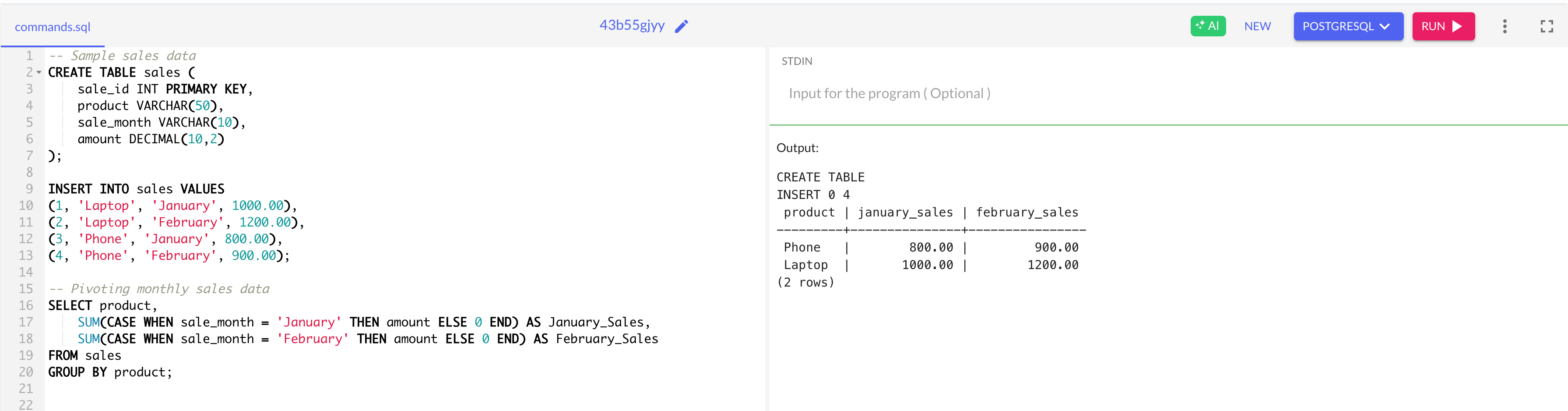
📌 Code Execution Flow
1️⃣ Creating the Sales Table
The
salestable is created with:sale_id(Primary Key)product(VARCHAR, name of the product)sale_month(VARCHAR, records month of sale)amount(DECIMAL, sales amount)
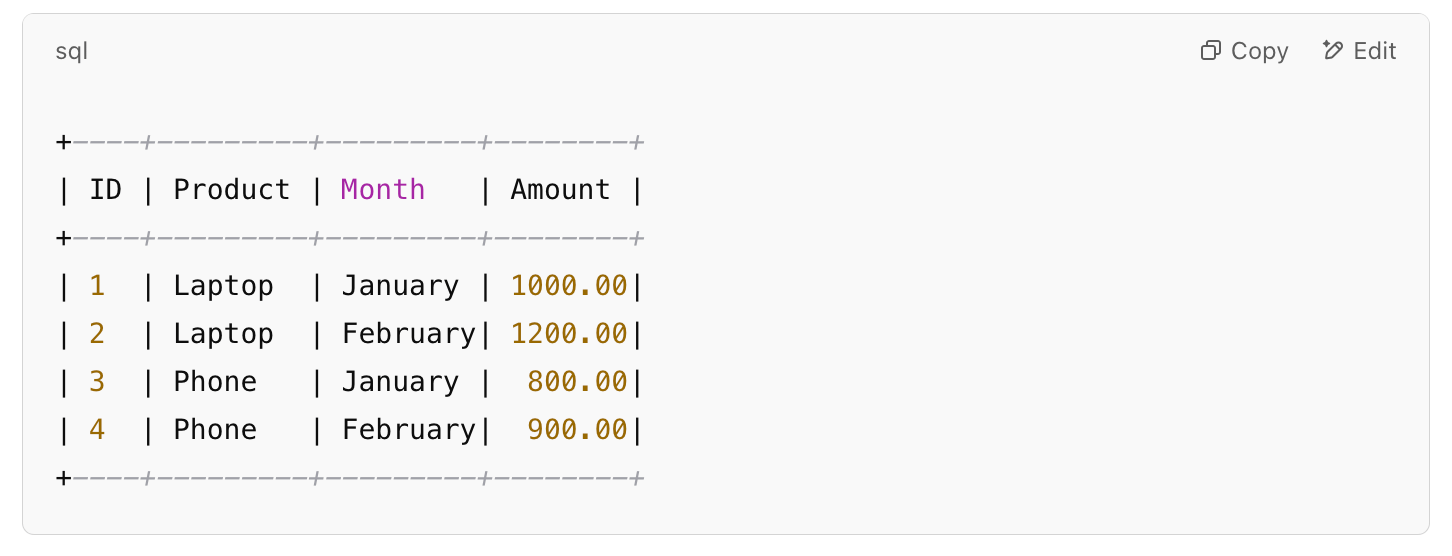
2️⃣ Inserting Sample Data
Four records are inserted:
3️⃣ Pivoting Data with CASE Statements
The
SELECTquery aggregates sales for each product while transformingsale_monthvalues into separate columns.The
SUM(CASE WHEN sale_month = 'January' THEN amount ELSE 0 END) AS January_Salesstatement ensures that:The sales amount is counted only for January.
If not January, it defaults to
0.
Similarly, another
SUM(CASE WHEN sale_month = 'February' THEN amount ELSE 0 END) AS February_Salesis applied for February.
4️⃣ Final Output Table
The pivoted table presents product-wise monthly sales totals:
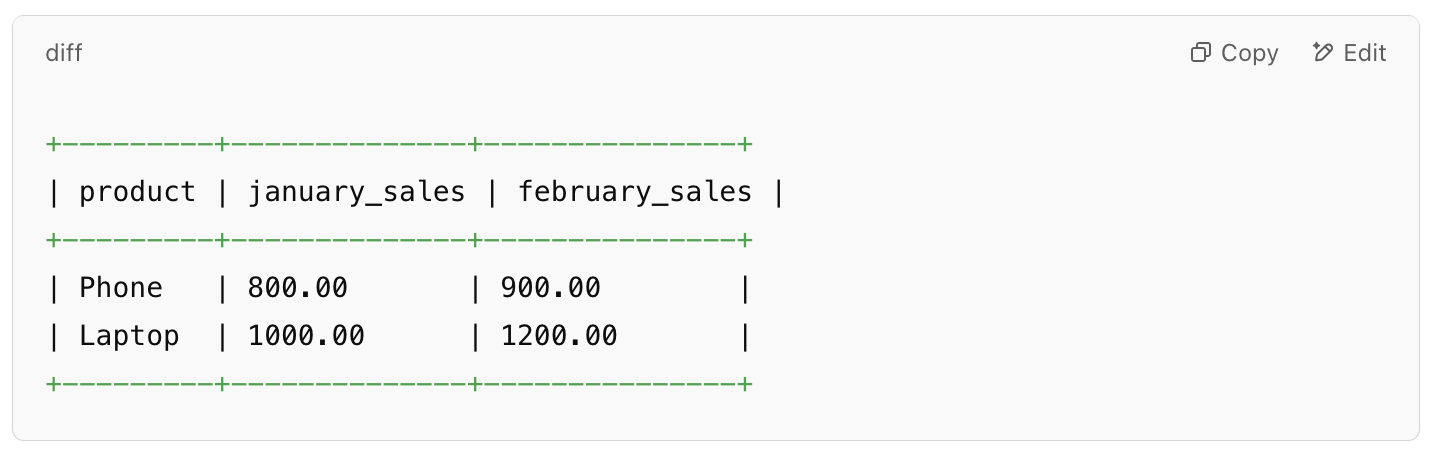
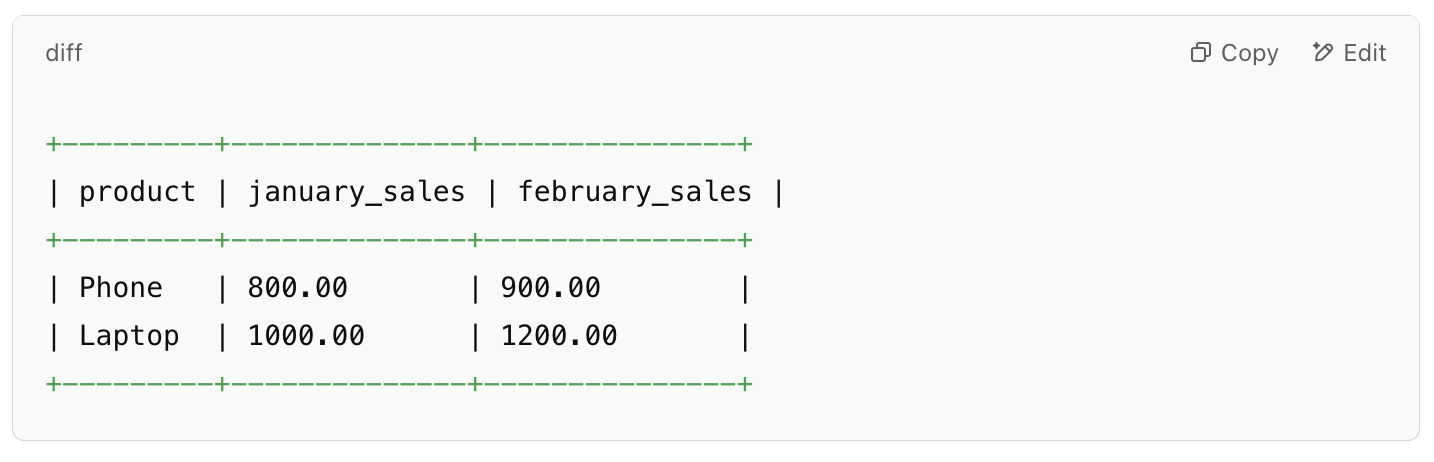
✅ Expected Output Breakdown
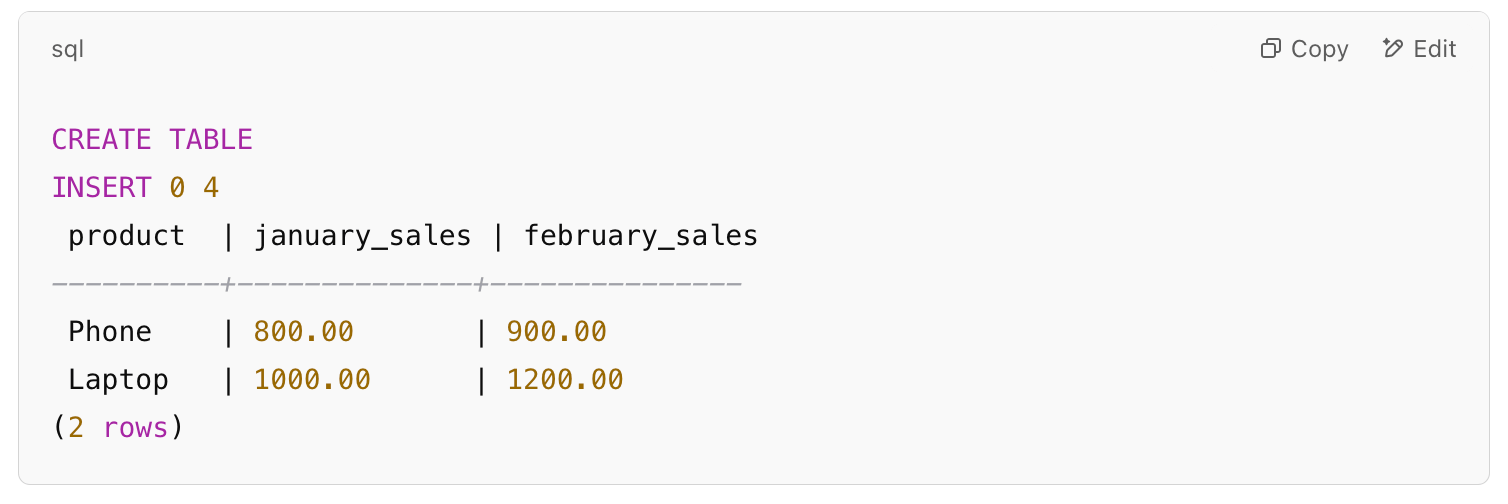
🔹 Key Takeaways
✔ CASE + SUM is used for pivoting rows into columns, making data more readable for analysis.
✔ Grouping by product ensures monthly totals are calculated separately for each product.
✔ This method is helpful for sales reports, performance tracking, and analytical dashboards.
🔍 What’s Happening?
✔ Transforms month-wise sales data into separate columns for better readability.
💡 Best Practices for Pivoting Data:
✔ Use PIVOT for categorical data transformation.
✔ Consider aggregating measures (SUM, COUNT) for better insights.
✔ For databases without PIVOT, use CASE WHEN with GROUP BY as shown above.
🐍 Python Challenge - Decorators (Deep Dive & Use Cases)
👉 Question: What will be the output of this Python code?
🔘 A) 'Before function' -> 'Hello!' -> 'After function'
🔘 B) 'Hello!'
🔘 C) Error
🔘 D) 'After function' -> 'Hello!' -> 'Before function'
✅ Answer: A) 'Before function' -> 'Hello!' -> 'After function'
📖 Explanation:
Python decorators allow us to modify function behavior by wrapping them. This is useful for logging, authentication, and function execution timing.
🔹 Where It’s Used in Real-World Applications?
✅ API Rate Limiting: Restricting API calls using decorators.
✅ Logging Function Calls: Automatically log function execution time.
✅ Access Control: Enforcing authentication in web applications.
Run & Test on onecompiler.com
1️⃣ Open onecompiler.com, select Python.
2️⃣ Copy and paste the following script:
def decorator_function(original_function):
    def wrapper_function():
        print("Before function execution")
        original_function()
        print("After function execution")
    return wrapper_function

@decorator_function
def say_hello():
    print("Hello!")

say_hello()
3️⃣ Click Run and observe the output.

📌 Code Execution Flow
1️⃣ Defining the Decorator Function:
decorator_function(original_function)takes another function as an argument.Inside,
wrapper_function()is defined to execute additional code before & after callingoriginal_function().The decorator returns
wrapper_function, effectively wrapping the original function.
2️⃣ Applying the Decorator (@decorator_function)
The
say_hello()function is wrapped bydecorator_function, meaning that whensay_hello()is called, the wrapper executes instead.
3️⃣ Calling say_hello()
The decorator ensures that:
"Before function execution" is printed.
say_hello()runs and prints "Hello!"."After function execution" is printed.
🔍 What’s Happening?
✔ Function execution is wrapped with additional logic before and after.
💡 Best Practices for Using Decorators:
✔ Use @functools.wraps to preserve function metadata.
✔ Stack multiple decorators for added functionality.
✔ Avoid modifying function parameters inside decorators unless necessary.
