

🔓 📢 Day 14/30 - DEEP DIVE SOLUTIONS: SQL, PYTHON, ETL, DATA MODELING
Solutions for March 13th, 2025 CHALLENGE – Unlock the Full Breakdown + Live Runnable Code! 🚀

👋 Hey Data Engineers!
Welcome to Day 14 of the 30-Day Data Engineering Challenge 🚀
Today’s Challenge Covers:
✅ SQL Indexing (Boosting Query Performance)
✅ Python Garbage Collection (Memory Management)
✅ ETL Data Loading Strategies (Incremental vs. Full Load)
✅ Dimensional Modeling (Understanding Slowly Changing Dimensions)
🧠 Don’t just memorize—understand. Every challenge solution includes:
✅ Clear explanation & reasoning
✅ Why this solution works
✅ Key optimizations & best practices
📢 Want deep dives + runnable code? Upgrade to the Annual Plan and master these concepts like a pro!
Solutions for March 14th, 2025 Challenge – Unlock the Full Breakdown + Live Runnable Code! 🚀
👋 Hey Data Engineers!
Welcome to Day 14 of the 30-Day Data Engineering Challenge! 🚀
Today’s Deep Dive Covers:
✅ SQL Indexing (Boosting Query Performance)
✅ Python Garbage Collection (Managing Memory Efficiently)
✅ ETL Data Loading Strategies (Incremental vs. Full Load)
✅ Dimensional Modeling (Slowly Changing Dimensions - SCD Type 2)
🧠 Master these concepts with:
✅ Clear explanations & reasoning
✅ Runnable code + breakdowns
✅ Real-world best practices
📢 Upgrade now for more deep dives + hands-on coding practice!
📌 SQL Challenge - Understanding Indexing
Understanding SQL Indexing
Indexes improve query speed by optimizing search and retrieval operations.
🔹 Where It’s Used in Real-World Applications?
✅ E-commerce Applications – Faster product lookups.
✅ Analytics Dashboards – Optimized reporting on large datasets.
✅ Database Performance Tuning – Reducing full-table scans.
Run & Test on OneCompiler.com
1️⃣ Open onecompiler.com, select SQL (PostgreSQL or MySQL).
2️⃣ Copy and paste the following query:
-- Create Sales Table
CREATE TABLE sales (
    sale_id INT PRIMARY KEY,
    customer_name VARCHAR(100),
    total_amount DECIMAL(10,2),
    sale_date DATE
);

-- Insert Sample Data
INSERT INTO sales VALUES
(1, 'Alice', 200.00, '2025-03-01'),
(2, 'Bob', 350.00, '2025-03-05'),
(3, 'Charlie', 500.00, '2025-03-10'),
(4, 'David', 600.00, '2025-03-15');

-- Create an Index on Sale Date for Faster Queries
CREATE INDEX idx_sale_date ON sales(sale_date);

-- Query using Index
EXPLAIN ANALYZE SELECT * FROM sales WHERE sale_date >= '2025-03-05';
3️⃣ Click Run and analyze the output.
🔍 What’s Happening?
✔ Index on sale_date allows fast lookups instead of full table scans.
✔ EXPLAIN ANALYZE shows how the query execution plan changes with indexing.
🔹 Best Practices for Indexing
✅ Use B-Tree indexes for high-cardinality columns (e.g., customer_id).
✅ Avoid indexing columns with few unique values (e.g., status = active/inactive).
✅ Regularly monitor index performance using pg_stat_user_indexes in PostgreSQL.
🐍 Python Challenge - Garbage Collection
Understanding Python’s Garbage Collection
Python automatically manages memory but allows manual garbage collection using the gc module.
🔹 Where It’s Used in Real-World Applications?
✅ Big Data Processing – Avoiding memory leaks in large datasets.
✅ Machine Learning Pipelines – Managing RAM for model training.
✅ Web Applications – Cleaning up unused objects dynamically.
Run & Test on OneCompiler.com
1️⃣ Open onecompiler.com, select Python.
2️⃣ Copy and paste the following script:
import gc

# Create objects and manually check memory usage
class Sample:
    def __init__(self):
        print("✅ Object Created")

obj = Sample()

# Delete object and run garbage collection
del obj
print("♻️ Running Garbage Collection...")
gc.collect()

print("✅ Garbage Collection Completed!")
3️⃣ Click Run and analyze the output.
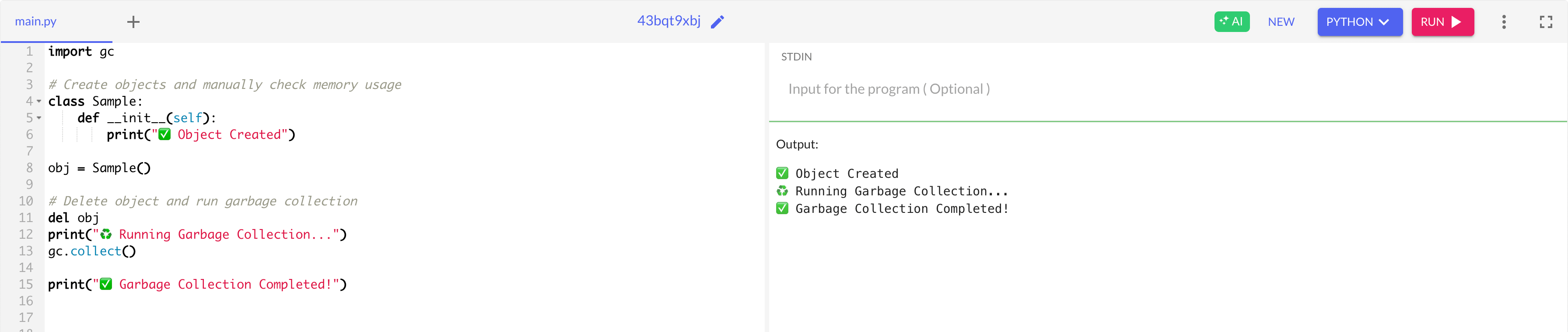
🔍 What’s Happening?
✔ Python automatically deallocates unused objects.
✔ Calling gc.collect() forces garbage collection when needed.
🔹 Best Practices for Garbage Collection
✅ Avoid circular references that prevent automatic cleanup.
✅ Use del to remove objects explicitly when handling large data.
✅ Monitor memory usage using gc.get_stats().
⚡ ETL Challenge - Incremental vs. Full Data Load
